

Technical Readiness
Can AI agents use your website? Three gates to check
Allowing AI crawlers in robots.txt doesn't mean an AI agent can use your site. This guide covers the three checks that decide it, and how to run each one on your own pages.
Updated
Questions this guide answers
- Can AI agents use my website?
- My robots.txt allows AI crawlers. Why can an AI agent still be blocked?
- Do AI crawlers and AI agents run JavaScript?
- How do I test my website the way an AI agent sees it?
Direct answer
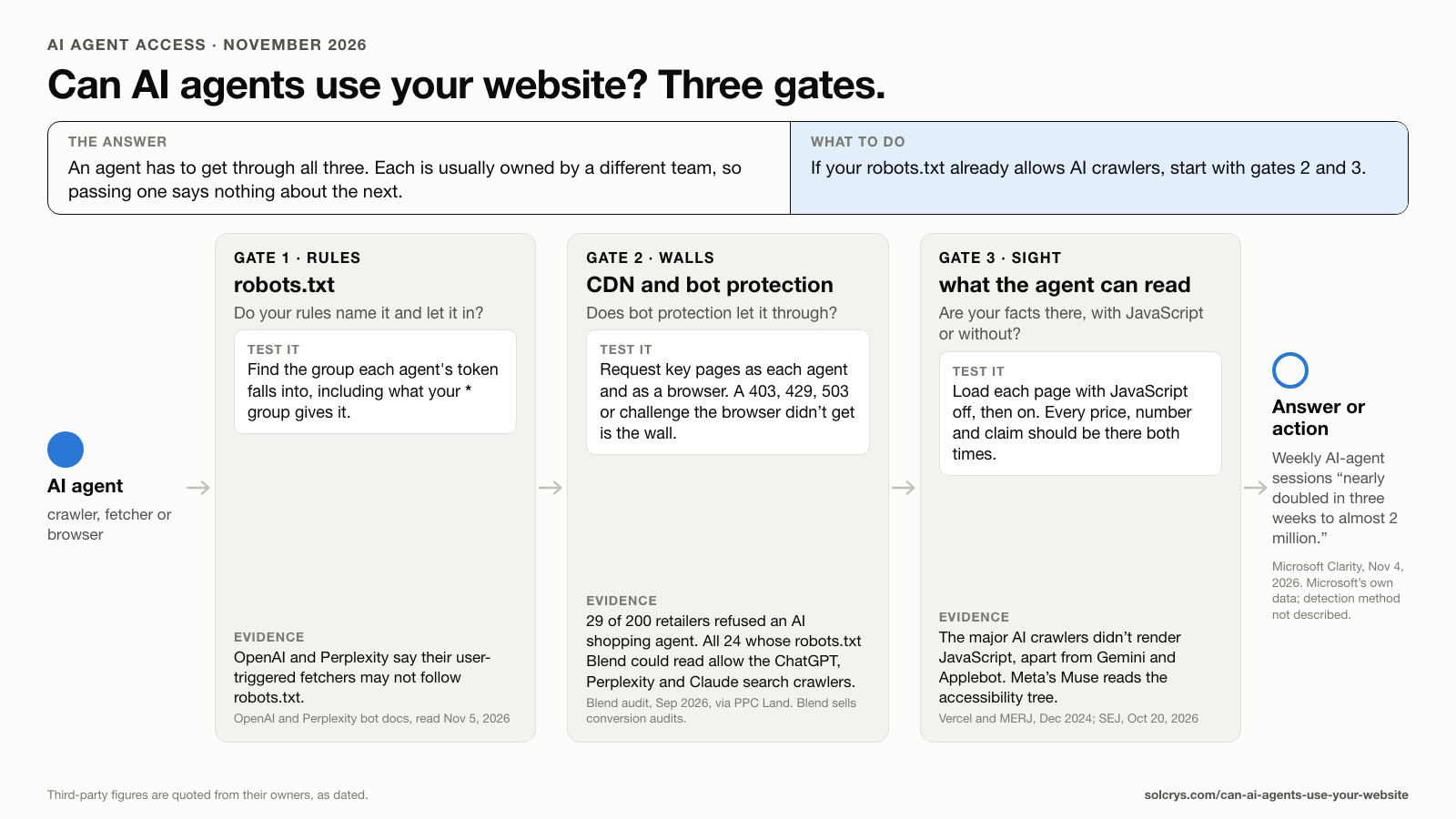
An AI agent can use your website only if it gets through three gates. Gate 1, rules: what your robots.txt says to the agent's name. Gate 2, walls: what your CDN or bot protection does when the request arrives. Gate 3, sight: whether the agent can read your facts once it's in: in the HTML your server sends, for crawlers that don't run JavaScript, and in the accessibility tree, the page outline screen readers also use, for browsing agents that do.
If your robots.txt already allows AI crawlers, start with gates 2 and 3. Each gate is usually owned by a different team, so passing one says nothing about the next.
Why this matters now
On Nov. 4, 2026, Microsoft Clarity added an Agent Activity view and tests of whether an agent can finish a task on your site, and wrote that "weekly sessions from AI agents nearly doubled in three weeks to almost 2 million."
Gate 1: rules (robots.txt)
Robots.txt is matched by name, so it governs only the agents that announce one, and not every agent follows it: OpenAI says robots.txt rules "may not apply" to ChatGPT-User, its user-triggered fetcher, and Perplexity says Perplexity-User "generally ignores" them. Robots.txt states your intent to named crawlers; it isn't access control, and Search, agent, or training? covers which tokens to allow. To check this gate:
- List each agent you care about by its token, and mark it search, user-triggered, or training.
- Give each one its own group, or know what your
*group gives it.
Gate 2: walls (bot protection and the CDN)
Your CDN, firewall, or bot manager decides on every request, whatever robots.txt says, by name, IP range, behavior, or browser fingerprint. Cloudflare, for example, sets Search, Agent, and Training separately and keeps a list of verified bots; a verified bot "obeys robots.txt and crawl directives, maintains reasonable request rates, and has not been observed evading website owner preferences."
The two can disagree. In a Sept. 8–15, 2026 test, Blend sent an unmodified Chromium browser that named its audit to 200 UK and US retailers, and 29 refused it (14.5%). Blend could read robots.txt for 24 of the 29, and according to PPC Land, "every one of the 24 allows the search crawlers from ChatGPT, Perplexity and Claude." Blend sells conversion audits, so read this as evidence that the gap exists, not as a market-wide rate.
A test request carries the agent's name but not its IP address, so it shows what the wall does with the name; your bot manager's logs show what it does with the real crawler. To check this gate:
- Request each key page with each agent's published user agent and with a browser's.
- Record the status, redirects, size, and any challenge page. A 403, 429, 503, or challenge the browser didn't get is the wall.
- Make your bot manager's AI and verified-bot settings say what robots.txt says.
Gate 3: sight (what the agent can read)
An agent that gets a 200 can still miss your facts. Google renders JavaScript but notes that "not all bots can run JavaScript." Vercel and MERJ found in December 2024 that "none of the major AI crawlers currently render JavaScript," apart from Gemini (through Googlebot) and Applebot.
Browsing agents do run the page, and some read its accessibility tree: Meta says the browsing sub-agent in Muse "sees an accessibility tree snapshot of the page, not the raw DOM," Search Engine Journal reported on Oct. 20, 2026.
To check this gate, load each page twice in a headless browser, once with JavaScript off and once with it on, and dump the accessibility tree both ways. Then confirm:
- Every price, plan name, number, and claim is in the server HTML as text, along with your JSON-LD. Numbers that read 0 or are blank without JavaScript are a common miss; count-up counters do this.
- Each fact has one copy, or every copy is generated from one source. Hand-kept copies drift apart, which is what a consistency audit looks for.
- The accessibility tree carries the same facts as the page people see.
Run the check yourself
Start with the pages that carry your facts: home, pricing, product, and About. The script check_agent_gates.py (Python, with requests and Playwright) runs all three gates. Point it at your pages with --pages, and list the facts each must carry with --facts. It spaces its page requests two seconds apart and saves the raw HTML, the text with and without JavaScript, both accessibility trees, and a results file. Rerun it after every change to robots.txt, the CDN, or page templates.
One limit: Anthropic publishes its agents' names but not full user-agent strings, so the script sends those names in a minimal string.
For gate 3, a SolCrys Content Audit reads the page the way a crawler does, runs a fixed set of checks, and turns every failed or partial check into a specific edit.
Sources
- PPC Land: Bot protection blocks Blend's AI shopping agent at 29 of 200 retailers (Nov. 5, 2026)
- Microsoft Clarity blog: Clarity connects agents, LLMs, and people (Nov. 4, 2026)
- Search Engine Journal: personal AI agents and what they read (Oct. 20, 2026)
- OpenAI: Overview of OpenAI crawlers (GPTBot, OAI-SearchBot, ChatGPT-User)
- Anthropic: how Anthropic's bots crawl the web (ClaudeBot, Claude-SearchBot, Claude-User)
- Perplexity: Perplexity crawlers (PerplexityBot, Perplexity-User)
- Cloudflare: Verified bots
- Google Search Central: Understand JavaScript SEO basics ("not all bots can run JavaScript")
- Vercel: The rise of the AI crawler, with MERJ (Dec. 17, 2024)
FAQ
Is it OK to test my site with an AI crawler's user agent?
On your own site, yes, if you keep it slow, as the script does. Don't point it at sites you don't own.
Free ChatGPT visibility check
See where AI answers skip your brand — then fix it, free
Start a free workspace with your domain: 10 buyer-intent prompts through ChatGPT show where you are mentioned, cited, or skipped, and who gets recommended instead. A free content audit in the same workspace hands you the first fix to ship.
Free · No credit card · About 5 minutes
Related guides
Technical Readiness
Search, Agent, or Training? How to Set AI Crawler Access in 2026 Without Blocking Your Own Citations
Which AI crawlers to allow, what Cloudflare's Sept. 15, 2026 rules changed, and how to block AI training without losing your AI citations.
Technical Readiness
Animated Stat Counters Can Read 0 to AI Crawlers: How to Check and Fix Them
Elementor, Divi, and Kubio counters put a 0 or an empty slot in the HTML and fill in the real number with JavaScript. How to check a page and fix each builder.
Technical Readiness
AI Crawler and Answer Readiness Checklist
A practical checklist for making website content crawlable, indexable, structured, and answer-ready for AI search and answer engines.
Risk Monitoring
Your Own Pages Disagree, and AI Repeats It: Run a Consistency Audit Before AEO
When your homepage, FAQ, help center, and press releases disagree, AI answers can repeat either version. How to audit and fix your own pages first.
How SolCrys Works
What a SolCrys Content Audit Looks Like
What a SolCrys Content Audit checks on one URL, how the score and recoverable points work, and how a fix is promoted, published, and re-audited.
Technical Readiness
How to Get AI Engines to See Your Updates Faster
An AI answer can't reflect your update until the engine refetches the page. How Google, ChatGPT, Perplexity, Claude, and Bing find changes, what IndexNow does, and how to check.
Strategy & Positioning
Your Website Has a Third Audience Now — Agents
AI agents are a third audience for your website — alongside humans and search crawlers. Eason Wang on what changes for product UX when agents see what humans can't, and miss what humans take for granted.